Using IPC360 Assistant
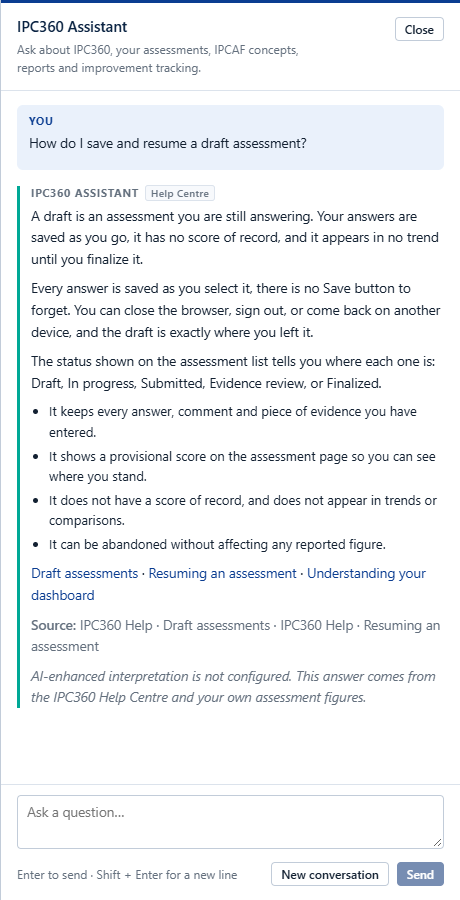
Open the Assistant from the Ask Assistant button in the top bar, or from the Help Centre. Ask in your own words, “How do I start an assessment?”, “What does Draft mean?”, “Why did we score 425?”, “What should we prioritise?”.
What it can do
- Explain how to use any part of IPC360, drawing on this Help Centre.
- Explain IPCAF concepts, the core components, scoring and the IPC levels.
- Summarise your own latest result, your weakest components and what changed since your previous assessment.
- Point you to the right Help article, and show the source behind an answer.
- Offer to put you in touch with MAUK Solutions when the answer is not something it holds.
What it will not do
- It will not show you another doctor’s assessment. It can only reach what your own account is permitted to see.
- It will not invent WHO guidance, hospital policy, legislation or results. If it does not know, it says so.
- It is not a clinical tool: it does not diagnose patients, recommend treatment, or replace your hospital’s clinical governance. For a clinical or emergency question, use your hospital’s own clinical channels.
Note: Where no AI provider is configured, the Assistant answers from the Help Centre and your own assessment figures. It says so plainly rather than pretending to be something it is not.
Conversations
A conversation lasts as long as the browser tab. It is not stored as a clinical record, and “New conversation” clears it. Do not type passwords or patient-identifiable information into it.
Source: IPC360 Help · IPC360 Assistant
Related
- Contacting MAUK SolutionsThe MAUK Solutions team can help with IPC360 setup, access, product support and technical issues, by email, and by WhatsApp where a number has been configured.
- Reporting a problem or sending feedbackUse Report a problem to send a bug, a question, a missing feature or a suggestion to MAUK Solutions, with the page you were on attached automatically.
- What the score meansThe score is a structured summary of the answers recorded for your programme at one point in time, comparable with your own earlier assessments.
Did this answer your question?
Ask IPC360 Assistant if you need this applied to your own assessment, or contact the MAUK Solutions team.
See also: What IPC360 is · Using the Help Centre · I cannot sign in