Selecting the hospital being assessed
Every assessment records which facility it describes; your primary hospital is preselected, and you can choose another facility instead.
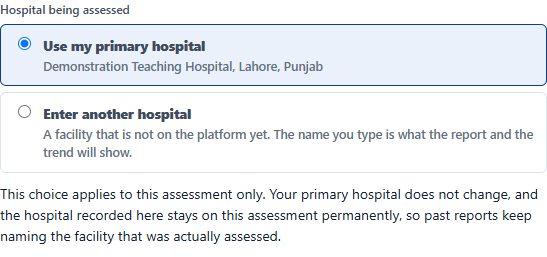
The hospital picker appears when you create an assessment. It offers your primary hospital first, then the other facilities you are assigned to, and finally the option to name a facility that is not on the platform.
- Use my primary hospital: the normal choice.
- Another hospital I am assigned to, for doctors who cover more than one facility.
- A hospital not on the platform, type the name; the assessment records the name but is not added to that facility’s trend.
Why it matters
The facility recorded here is the one named on the report, and the one whose trend the assessment joins. Once the assessment leaves draft, it is fixed: a report reopened years later must still name the facility that was actually assessed.
Source: IPC360 Help · Choosing the hospital
Related
- Assessing another hospitalYou can assess a facility other than your primary hospital; the assessment stays yours, and the facility assessed is recorded separately on the report.
- Your primary hospitalYour primary hospital is the hospital your account belongs to: the one you set up when you created your account, or the one an administrator assigned you. It is preselected whenever you start a new assessment.
- A hospital’s progress over timeThe trend chart plots every completed assessment for a hospital against the four IPC bands, with the most recent point marked as Latest.
Did this answer your question?
Ask IPC360 Assistant if you need this applied to your own assessment, or contact the MAUK Solutions team.
See also: Your hospitals · Setting up your account